> ## Documentation Index
> Fetch the complete documentation index at: https://help.i88.io/llms.txt
> Use this file to discover all available pages before exploring further.
# Track Global Economic Events — i88 Economic Calendar
> Monitor upcoming and past economic events worldwide — filtered by country, event type, and impact level — with the i88 Economic Calendar.
The i88 Economic Calendar tracks scheduled economic releases and events from around the world, including central bank decisions, inflation reports, employment data, and GDP releases. Knowing when high-impact events are due helps you anticipate potential market volatility and plan your analysis accordingly. Access the Calendar by clicking **Cal** in the left navigation rail, or by navigating directly to [i88.io/calendar](https://i88.io/calendar).
 ## Browsing Events
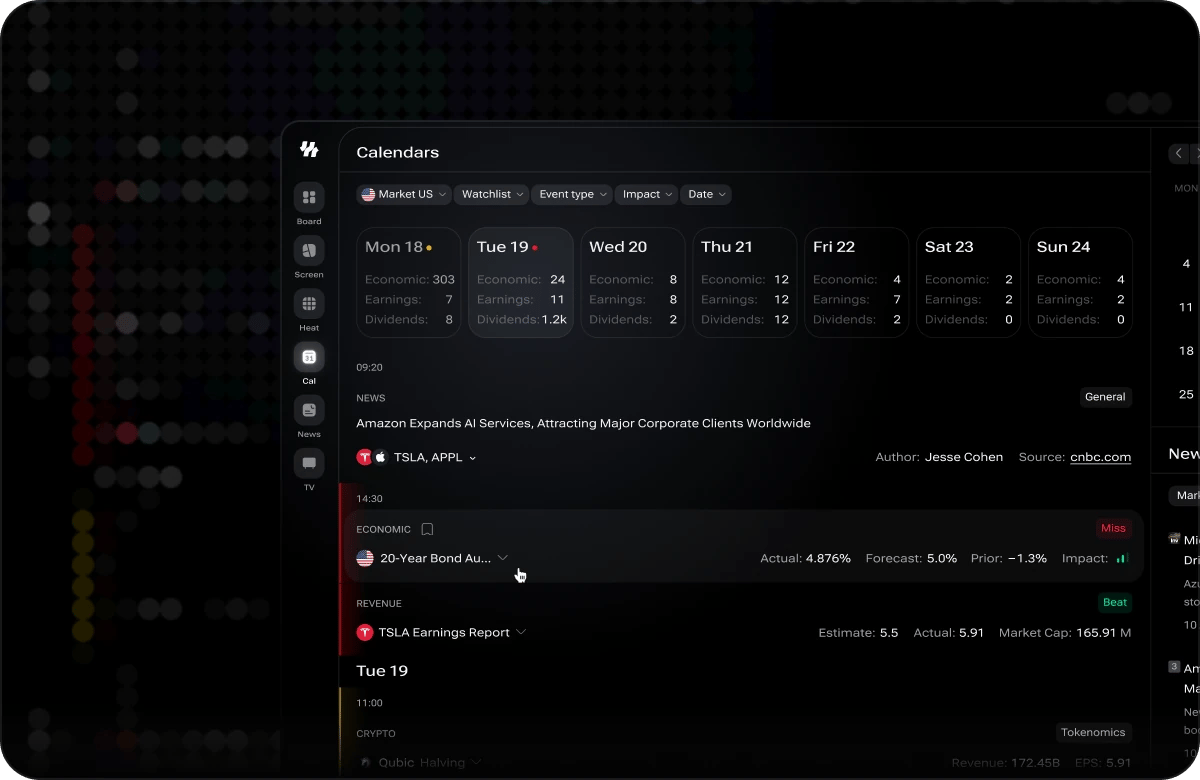
Events are listed in chronological order with the current date visible by default. Each event card shows the event name, the country it originates from, the scheduled time, its impact level, and the previous and forecast values where available.
Use the date navigation controls at the top of the calendar to move forward to upcoming events or backward to review past releases. Past events also display the actual reported value alongside the forecast, so you can quickly see whether the result beat or missed expectations.
## Filtering Events
Narrow the calendar down to the events most relevant to your analysis using the three available filters.
Select **Entire World** to see events from all countries, or pick a specific country to focus only on releases from that economy.
Filter by the category of economic release — such as **GDP**, **CPI**, **interest rate decisions**, **employment**, **retail sales**, and more — to focus on the data types that matter most to your strategy.
Filter by **Low**, **Medium**, or **High** impact to control the volume of events shown. Each event card displays a visual impact indicator so you can assess significance at a glance.
## Understanding Impact Levels
Every event on the calendar carries an impact rating that indicates its potential effect on market volatility.
* **Low impact** — Minor releases that rarely cause significant price moves. Useful for comprehensive tracking but unlikely to shift market direction on their own.
* **Medium impact** — Releases that can cause moderate volatility, especially if the result deviates significantly from consensus forecasts. Worth monitoring if you are trading assets sensitive to that data type.
* **High impact** — Major releases such as central bank rate decisions, non-farm payrolls, or CPI prints that frequently drive sharp, broad market moves. Pay close attention to these events and their scheduled times.
## Clearing Filters
To reset the calendar to its default view, click the **Clear** button. All active country, event type, and impact filters are removed, and the full global event list is restored.
During Open Alpha, calendar events may occasionally shift in time or have their data updated as i88 receives revised information from upstream providers. If you notice an event time or value change, this is expected behavior and reflects the most current data available.
## Browsing Events
Events are listed in chronological order with the current date visible by default. Each event card shows the event name, the country it originates from, the scheduled time, its impact level, and the previous and forecast values where available.
Use the date navigation controls at the top of the calendar to move forward to upcoming events or backward to review past releases. Past events also display the actual reported value alongside the forecast, so you can quickly see whether the result beat or missed expectations.
## Filtering Events
Narrow the calendar down to the events most relevant to your analysis using the three available filters.
Select **Entire World** to see events from all countries, or pick a specific country to focus only on releases from that economy.
Filter by the category of economic release — such as **GDP**, **CPI**, **interest rate decisions**, **employment**, **retail sales**, and more — to focus on the data types that matter most to your strategy.
Filter by **Low**, **Medium**, or **High** impact to control the volume of events shown. Each event card displays a visual impact indicator so you can assess significance at a glance.
## Understanding Impact Levels
Every event on the calendar carries an impact rating that indicates its potential effect on market volatility.
* **Low impact** — Minor releases that rarely cause significant price moves. Useful for comprehensive tracking but unlikely to shift market direction on their own.
* **Medium impact** — Releases that can cause moderate volatility, especially if the result deviates significantly from consensus forecasts. Worth monitoring if you are trading assets sensitive to that data type.
* **High impact** — Major releases such as central bank rate decisions, non-farm payrolls, or CPI prints that frequently drive sharp, broad market moves. Pay close attention to these events and their scheduled times.
## Clearing Filters
To reset the calendar to its default view, click the **Clear** button. All active country, event type, and impact filters are removed, and the full global event list is restored.
During Open Alpha, calendar events may occasionally shift in time or have their data updated as i88 receives revised information from upstream providers. If you notice an event time or value change, this is expected behavior and reflects the most current data available.