

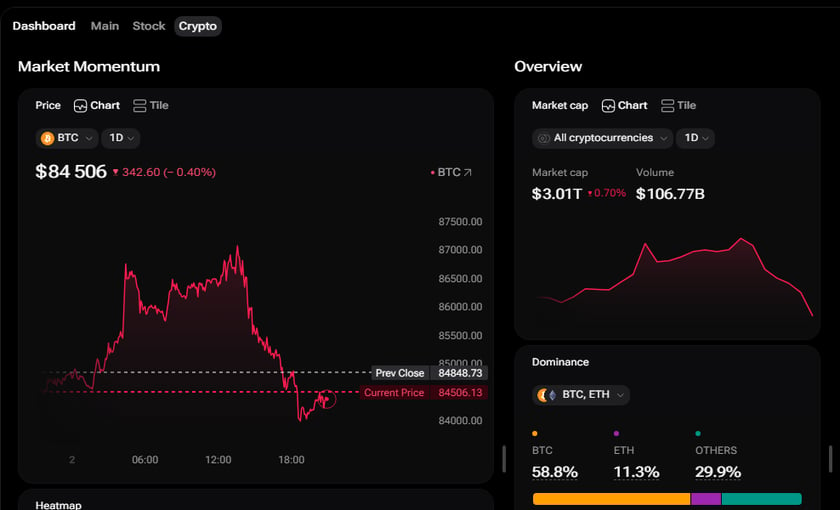
The Crypto dashboard
Crypto and Stock dashboards
The Crypto and Stock tabs next to Main were marked coming soon. Both are now full dashboards, open to everyone, signed in or not. See Dashboard overview for the tabs side by side. Crypto is built around digital assets:- Market Momentum — the Bitcoin price chart, with the crypto Heatmap below it.
- Overview — total crypto market cap, Bitcoin and Ethereum dominance, an Ethereum price tile and a list of leading coins.
- News — the latest crypto headlines, in a column of their own.
- Gainers and Losers — the day’s biggest crypto movers up and down, each in a column of its own.
- Exchanges — a wide column with centralised and decentralised crypto venues, their 24-hour volume, listings and trust score. See Exchanges.
- Market Momentum — the S&P 500 price chart, performance by sector and the year-to-date of the world’s top indices.
- Overview — compact price tiles, the top stocks of the day, US inflation and the Fed funds rate.
- News and Economic Calendar — market news, the high-impact hour map for today and the calendar of releases.
- Gainers, Losers and Exchanges — the day’s biggest stock movers and a wide column of stock exchanges with their trading hours.
Main, refined
The Main dashboard keeps its widgets and its order. Their heights are adjusted so lists, charts and macro panels show in full instead of being cut off at the bottom.Columns that fill the screen
On a wide screen, when a dashboard’s columns together are narrower than the space available, they now stretch to fill it — each in proportion to its own width. The main chart column stays the widest, instead of every column growing to the same size. When the columns are wider than the screen, nothing changes: they keep their widths and you scroll through them as before. Dragging a column edge works in the stretched layout too, and the column settles where you let it go.Explore on ticker pages
Ticker pages hold a lot: on a stock, sections from Valuation & Estimates to Peer Analysis, each with several widgets. A new Explore list under Price performance maps them out. Open a section to see its widgets, click one, and the page brings the full layout into view and scrolls straight to that widget — switching to the right tab when the widget shares a panel with others, such as the oscillators and moving averages under Technicals. Explore lists only what the page actually shows for that asset, so a section without data for the ticker is left out. It is there on stock, ETF, crypto, forex and index pages on wide screens; see Ticker pages.Tables, column by column
When a table is wider than its frame, the arrow buttons under it now step through the columns one at a time, lining the next one up with the edge instead of jumping by a screen and stopping mid-column. Press quickly and each click still lands on the next column. Columns pinned in place, such as the row actions at the right of a table, no longer end in a hard line: the scrolling columns slide underneath them and fade out at the edge.Tabs stay where you drop them
Dragging a dashboard tab to the very first or very last place in the tab row could make it jump back. It now stays where you drop it, at either end of the row.Dashboards that keep up
When we add, move or remove widgets on the Main, Crypto or Stock dashboards, your copy picks up the change on its own, and your sizes, order and filters are kept. A short notice says the dashboard was updated and offers a What changed button. It opens a list of every new and removed widget or column, each marked with where it sits; click one and the dashboard scrolls to it and highlights it. The notice does not time out: it stays until you open What changed or close it. If you switch to another dashboard first, it steps aside and comes back the next time you open the updated one. Once in a while a dashboard needs a fresh start rather than an update. Then the notice says plainly that the layout was reset to the new default, and What changed puts that first, ahead of the widgets that came with it. Widgets keep the height you give them for each display option, such as Chart or Tile, and, when you are signed in, that height is saved with your dashboard.With this update, saved Main, Crypto and Stock layouts move to the new defaults once, and the notice tells you so: your earlier changes to these three dashboards are replaced by the new layout. Dashboards you created yourself are not affected. To rebuild a personal arrangement, use Set Up → Add and drag widgets where you want them — see Customize your layout.
Added
- Crypto dashboard with the Bitcoin chart, the crypto heatmap and a market overview
- Crypto news, gainers and losers, each in its own column
- A wide Exchanges column with centralised and decentralised crypto venues
- Stock dashboard with the S&P 500 chart, sector performance and world indices
- Top stocks, the economic calendar and stock exchanges on the Stock dashboard
- Layout updates that arrive on their own, with a What changed list that highlights each change
- Explore on ticker pages: open a section and jump straight to any of its widgets
Improved
- Main dashboard widgets are sized so their content is no longer cut off
- Columns stretch in proportion on wide screens, so the main chart stays the largest
- Widget height is remembered for each display option when you are signed in
- Table arrows move one column at a time and never stop halfway through a column
- Pinned table columns blend into the scrolling ones with a soft fade instead of a hard line
Fixed
- Dragging dashboard tabs to the first or last position now sticks
See Dashboard overview for the three tabs, Customize your layout for resizing and arranging widgets, Exchanges for the exchanges column, and Ticker pages for Explore.